Webbing for double dog leash couplers
A two-dog coupler joins two branches to a common connection. Its material brief needs branch geometry and hardware details, because equal cut lengths do not necessarily produce equal finished reach.
Content updated
In this guide
Key choices for your project
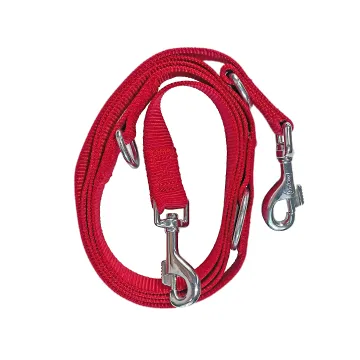
Draw both branches from the centre connector to the dog-side clips, including folds, adjusters and any swivel. State whether the branches must match or adjust independently. Compare finished attachment-to-attachment length after sewing, and evaluate the full arrangement to the buyer’s requirements before accepting a webbing change.
- Finished reach for each branch
- Centre junction and clip orientation
- Adjustment and assembled-product requirements
Measure between attachment points
Define the measurement endpoints on the drawing. A folded return, clip eye or central ring consumes part of the cut piece, and different clips can change the finished reach. Record left and right branches separately even when nominally identical. This makes unequal sample lengths easier to trace to cutting, folding or hardware.
Equal cut branches can finish at different reaches
Imagine two coupler branches cut to the same length. One dog-side clip has a deeper eye, its fold consumes more webbing and the sewn branch finishes shorter. At the centre, one seam catches beneath the other as both clips rotate. A swivel changes the movement but does not remove every crossing or hardware contact.
Define measurement endpoints from the centre connector to each attachment point, then draw folds, adjusters and hardware orientation on both branches. Build the complete coupler and measure finished left and right reaches separately. Move the branches through their intended range under the buyer’s representative evaluation conditions, checking crossed straps, trapped seams, rotation and connector contact.
Approve the two branches and centre junction as one assembly, using finished attachment-to-attachment dimensions rather than matching cut lengths.
Products to start with
Open a product to see its listed specification. Custom colours, dimensions and order terms are confirmed for your project.
More product photos
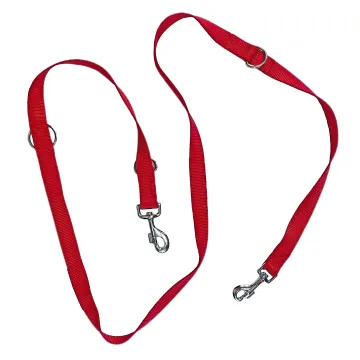
Check the centre junction as an assembly
Lay out both branches through their intended movement range and look for crossed straps, trapped seams or hardware contact. A swivel may change the way parts rotate but does not eliminate every source of tangling. Assess the actual junction, branch lengths and materials together rather than promising a tangle-free result from one component.
Specify branch geometry and the common junction
Record each finished path even when the nominal branches are intended to match.
Swipe to see all columns ↔
| Field | What to record | How to confirm |
|---|---|---|
| Coupler layout | Matched or independent branches, intended movement and buyer-defined requirements | Review the complete arrangement |
| Measurement points | Named centre and dog-side attachment datums for each branch | Show endpoints on the drawing |
| Webbing section | Width, thickness, edge, face and flexibility for each branch | Inspect relaxed and folded tape |
| Hardware | Centre connector, clips, swivels and adjusters, openings and orientation | Use production-intent parts |
| Folded joints | Insertion, fold length, layers, cut end, seam field and clearance | Build both finished branches |
| Finished reach | Left and right attachment-to-attachment length at relevant settings | Measure the assembled coupler |
A swivel influences rotation but does not justify a tangle-free claim; acceptance belongs to the complete coupler.
Download specification worksheet ↓Build and compare both coupler branches
Name the measurement datums
Mark the exact centre and clip attachment points for left and right branches before assigning cut length or adjustment.
Lay out both finished paths
Draw hardware, folds, seams, face direction and adjusters for each branch, including any intentionally independent setting range.
Assemble and measure separately
Build the centre junction and dog-side joints with intended parts, then record each finished reach from the named datums.
Move the complete junction
Rotate and separate both branches through representative positions, observing crossings, trapped seams, hardware contact and orientation before approval.
Shortcuts that hide coupler geometry
Joining two approved single leashes
Existing material approval does not validate the shared connector, branch orientation or combined movement. Review the complete coupler as a new assembly.
Matching cut lengths only
Different clip eyes, folds or seams consume different amounts. Control finished attachment-to-attachment reach for each branch instead.
Treating a swivel as tangle prevention
A swivel changes rotation at one point but cannot remove every strap crossing or hardware collision. Evaluate the actual junction movement.
Questions before you choose
Should both branches have the same width and length?
Only if the product design calls for it. Matched branches simplify part control, while independent adjustment introduces extra hardware and fold thickness. Send the intended geometry and validation criteria before choosing either construction.
Can two approved single-leash straps be joined into a coupler?
Their material approval is useful but does not validate the new junction. The shared connector, branch orientation and combined assembly need their own review. Include the complete coupler sample in the buyer’s test plan.
Tell us what you are making
You can enquire before every detail is settled. Tell us the intended use and what you need help choosing; add dimensions or quantities if you know them.
What happens after your enquiry
We review the intended use and open specification questions first. Sample options, costs, minimum quantities and timing can then be discussed against that brief. Sending an enquiry does not place an order.
Request a relevant sample →