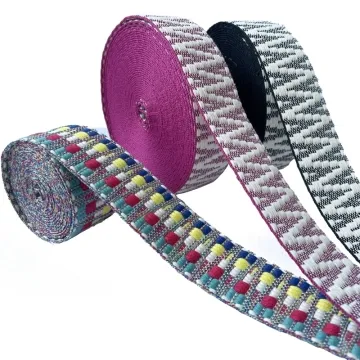
Heat transfer printed webbing
Heat and pressure affect the base tape as well as the image. Measure the printed sample again and test the fold and wash process used in your product.
Content updated
In this guide
Key choices for your project
Specify the base tape before approving a transfer print. Heat and pressure may change the feel or dimensions of the substrate. Use the printed sample in the sewing trial, and inspect fine lines after the cleaning and rubbing conditions agreed for the product.
- Base tape identification
- Dimensions after transfer
- Print condition after rubbing
A correct transfer image can change the tape beneath it
Imagine a heat-transfer proof with sharp artwork and approved film colour. On the intended tape, light tones pick up the base shade, the surface becomes glossier and the strip narrows slightly. After folding through hardware, the image cracks at the return while the unprinted control bends normally.
Cut an unprinted control beside each transfer specimen from the same roll position. Record dimensions and hand before pressing, then transfer full repeats with marked artwork origin and direction. Remeasure, cut and sew representative parts, route them through hardware and apply the agreed rubbing or cleaning sequence. Compare colour, fine detail, gloss, bend, edge shape and dimensional change against the paired control.
Approve heat-transfer printing as a specific base-tape, artwork and pressing combination, supported by same-roll controls and assembled product checks.
Keep an unprinted control from the same base roll
Cut a control beside every transfer trial before heat and pressure are applied. Compare width, length, surface gloss, bend and edge shape between the printed piece and its neighbouring control. This isolates process effects from normal base-tape variation and makes a later adjustment to temperature, pressure or dwell easier to evaluate.
- Printed trial paired with a same-roll control
- Dimensional and surface comparison after transfer
Approve colour as a base-and-transfer combination
Review the final colour over the actual base shade, including the lightest printed areas where the substrate can influence appearance. Keep the approved transfer artwork, base-tape code and physical sample together. A screen proof or film sample alone cannot represent the colour that buyers will see on the finished textured tape.
- Light-tone appearance over the selected base colour
- Artwork, substrate code and physical standard linked
Link the transfer image to its base and process
Keep substrate, artwork, pressing history, product layout and physical approval together.
Swipe to see all columns ↔
| Field | What to record | How to confirm |
|---|---|---|
| Base tape | Code and lot, fibre, weave, base shade, finish, width, face and direction | Retain a same-roll unprinted control |
| Transfer artwork | Revision, scale, colours, light-tone areas, repeat, origin and direction | Output at actual width |
| Pressing route | Trial reference, application sequence and later heat exposure | Label specimens by route |
| Process comparison | Width, length, gloss, hand, edge shape and bend before and after transfer | Compare each paired control |
| Product layout | Allowed cut areas, folds, seams, hardware returns and visible joins | Build representative finished parts |
| Approval condition | Viewing light, physical standard, rubbing or cleaning, care and inspection state | Compare marked samples together |
Transfer response depends on the exact tape and process. A screen proof or loose film does not establish the finished textured-tape result.
Download specification worksheet ↓Carry a paired control through transfer approval
Pair controls and trials
Cut adjacent marked pieces from one roll position, reserving one unprinted control for each proposed pressing route.
Transfer full repeats
Apply actual-width artwork with origin and direction marked, producing consecutive repeats that reveal joins and tonal change.
Measure and assemble
Compare dimensions, gloss, hand and edge shape, then cut, fold, sew and thread representative printed product parts.
Condition and compare
Apply agreed rubbing, cleaning or care, inspect fine detail and bends, and retain artwork, tape code, control and printed standard together.
Shortcuts that weaken transfer approval
Approving film or screen colour
Base shade and texture alter light tones and detail after transfer. Judge the print on the exact tape.
Changing the base after approval
A similar-looking tape can respond differently to heat and pressure. Repeat the paired-control trial when its construction changes.
Inspecting only a flat print
Folds, seams and hardware returns reveal cracking, stiffness and registration issues. Build the representative finished component.
Questions before you choose
Will heat-transfer printing work on any webbing material?
No. Transfer response depends on fibre, surface finish, base colour and the temperature the construction can tolerate. Confirm the process on the exact tape. Check shade, edge definition, hand, dimensional change and any effect on later folding or sewing.
Can heat transfer reproduce gradients and photographic detail on narrow webbing?
It can reproduce fine effects on compatible constructions, but narrow width, texture and repeat alignment may remove detail. Print the artwork at actual size and wrap it through the intended hardware. Approve after checking banding, small text and joins over a full repeat.
Products to start with
Open a product to see its listed specification. Custom colours, dimensions and order terms are confirmed for your project.
More product photos
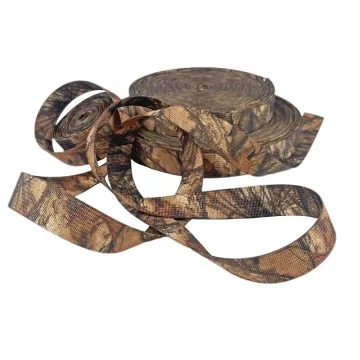
Tell us what you are making
You can enquire before every detail is settled. Tell us the intended use and what you need help choosing; add dimensions or quantities if you know them.
What happens after your enquiry
We review the intended use and open specification questions first. Sample options, costs, minimum quantities and timing can then be discussed against that brief. Sending an enquiry does not place an order.
Request a relevant sample →