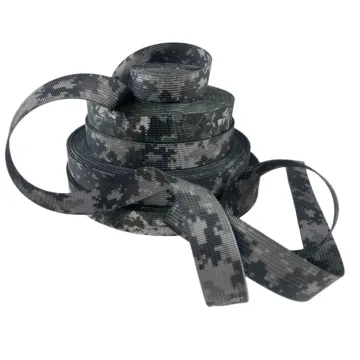
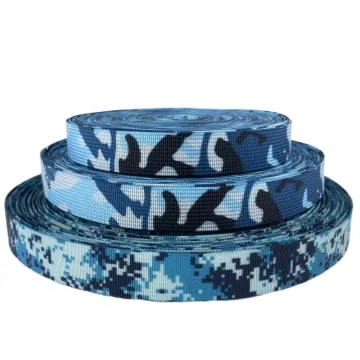
Gradient and multicolour printed webbing
A smooth digital gradient can band on a textured strap. Review the lightest tones, dark transitions and colour at folds on a sample printed at full scale.
Content updated
In this guide
Key choices for your project
Approve a full gradient at the final width. A smooth transition on a screen may become bands or lose detail on a ribbed tape. Include the lightest area and a section that bends around hardware, where the base colour can become more noticeable.
- Lightest tone reproduction
- Visible banding at actual width
- Appearance around a fold
A smooth file can produce mismatched gradient parts
Imagine a blue-to-yellow gradient continuous on screen. On ribbed base tape, the pale centre reveals more base colour and the darkest transition separates into bands. Two shoulder straps look unrelated because one runs light-to-dark and the other dark-to-light.
Print full-scale repeats on the intended base tape, with light, middle and dark patches from one run. Mark origin and direction before cutting. Assemble paired parts, folds and hardware returns; compare under agreed viewing conditions. Record whether pairs match, mirror or deliberately oppose.
Approve the gradient on identified base tape as full repeats and assembled parts, with tonal anchors, origin, direction and pairing rule fixed.
Add reference patches beside the continuous gradient
Include a small set of solid colour patches or named positions that represent the light end, midpoint and dark end of the approved gradient. They give production measurable comparison points when a smooth transition shifts subtly. Keep the patches outside visible cut parts if necessary, but print them in the same run on the same base tape.
- Reference positions for light, middle and dark tones
- Control patches printed with the production gradient
Control gradient direction across paired parts
Mark the light-to-dark direction on every cut component. Two shoulder straps cut in opposite directions can look mismatched even when they come from the same roll. Decide whether pairs mirror, match or intentionally oppose each other, then show start and finish colours on the assembled product drawing.
- Light-to-dark arrow on each cut part
- Approved relationship between paired gradients
Control colour change across the roll and product
Describe the gradient as a positioned colour sequence, not merely a multicolour artwork file.
Swipe to see all columns ↔
| Field | What to record | How to confirm |
|---|---|---|
| Base tape | Fibre, weave, base colour, finish, width, face and roll direction | Retain a labelled unprinted reference |
| Artwork sequence | File revision, finished scale, colour path, tonal steps and gradient origin | Output at actual tape width |
| Tonal anchors | Approved light, middle and dark positions with comparison conditions | Print reference patches in the trial |
| Repeat and join | Cycle, mirror or cut-end logic, repeat length and transition at the join | Inspect several consecutive repeats |
| Component direction | Part name, start colour, finish colour, visible face, fold and paired relationship | Mark the assembled product drawing |
| Approval conditions | Viewing distance, light, background, permitted banding and retained physical standard | Compare printed parts side by side |
Visual acceptance belongs to the specified tape, artwork, print route and product layout; a screen file cannot establish the production result.
Download specification worksheet ↓Carry the gradient from file to paired parts
Set anchors and direction
Mark origin, light-to-dark arrow, repeat join and reference colours on the actual-width file before preparing the print trial.
Print consecutive repeats
Use the intended base tape and print enough length to expose tonal stepping, lateral shift and the transition between repeats.
Cut and assemble positions
Take marked parts from light, middle, dark and join regions, then build paired straps, folds and hardware returns as designed.
Compare and retain
Review assembled parts under agreed conditions, record the pairing rule and keep labelled printed references linked to the approved file.
Shortcuts that hide gradient variation
Approving the screen image
Display colour and smoothness do not show base-tape texture, ink interaction or tonal stepping. Judge a full-scale physical print.
Sampling only the midpoint
The light end, darkest transition and repeat join can fail differently. Include all tonal anchors and consecutive repeats in approval.
Leaving part direction open
Correct prints can look mismatched when paired parts run opposite ways. Mark origin and light-to-dark direction for every cut component.
Questions before you choose
Why does a gradient look smooth on screen but banded on webbing?
The artwork may contain too few tonal steps, while tape texture, base colour and the print process reduce transitions further. Review a full-size colour proof and production-tape sample. Judge the gradient at normal distance, including the lightest and darkest sections.
How should a gradient repeat join on a continuous webbing pattern?
Decide whether the gradient cycles, mirrors or ends at a cut point. Build the artwork so the first and last colours meet intentionally, then print several repeats. Check joins after cutting and folding; an invisible roll join can become obvious on a short strap.
Products to start with
Open a product to see its listed specification. Custom colours, dimensions and order terms are confirmed for your project.
More product photos
Tell us what you are making
You can enquire before every detail is settled. Tell us the intended use and what you need help choosing; add dimensions or quantities if you know them.
What happens after your enquiry
We review the intended use and open specification questions first. Sample options, costs, minimum quantities and timing can then be discussed against that brief. Sending an enquiry does not place an order.
Request a relevant sample →