Why Webbing Twists After Sewing
A strap that twists after sewing may not begin with defective webbing. Roll skew, reversed cut pieces, mismatched left-right parts, asymmetric seams and hardware routing can create the same symptom.
Content updated
In this guide
Key choices for your project
Separate the tape from the assembly. Relax a cut piece and mark face, edges and roll direction, then compare it with an unsewn control. Build one assembly with mirrored parts and one with identical orientation. Apply the intended load and observe where rotation begins before altering the tape.
- Lay loose tape, pre-sewn cut parts and finished assemblies beside the approved direction sample.
- Trace face, roll direction, folds and hardware path separately for left and right products.
- Compare seam position and layer symmetry, then load along the actual product line.
Only the left leash twists when the handle is loaded
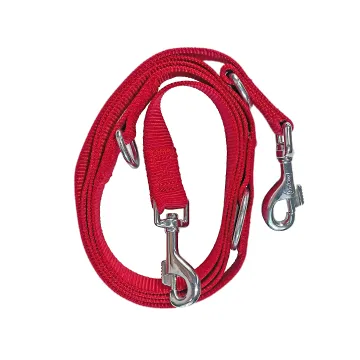
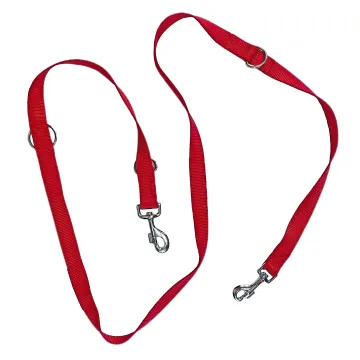
Imagine two leash prototypes from one roll. Both lie flat before assembly, but the left strap rotates under swivel-hook load. That piece was flipped, its seam off-centre and hook enters from the opposite face. Replacing the webbing would not show which change starts the turn.
Keep one twisted assembly, an unsewn control and marked cut pieces. Mark face, edges and roll direction. Build samples that vary orientation, seam symmetry or hardware routing one at a time, then video the unloaded and loaded path to find the first rotation.
Separate raw-tape shape from cutting, sewing and hardware routing, then correct the first demonstrated source of rotation rather than the visible twist.
Find whether twist exists before sewing
A relaxed loose strip reveals persistent skew or edge imbalance. If it lies flat but a cut part turns, cutting direction, end treatment or handling may be involved. If rotation begins only after stitching, compare seam offset, feed differential and unequal layer stiffness. A labelled face and roll-direction arrow on control pieces prevents accidental flipping during the investigation.
Follow rotation through the complete load path
A strap can be sewn correctly and still rotate if it enters a buckle from the wrong side or if the anchor points are not aligned. Video the unloaded and loaded product from a fixed view. Disassemble one sample step by step and compare a correctly routed control. Acceptance should reflect the worn or loaded orientation, while preserving evidence of which component caused the turn.
Record a post-sewing twist investigation
Keep tape orientation, assembly geometry and load path connected.
Swipe to see all columns ↔
| Field | Record | Confirm |
|---|---|---|
| Symptom | Twist direction, location, load state, timing and affected quantity | Video from a fixed view |
| Loose-tape control | Relaxed flatness, skew, edge shape, face and roll direction | Compare unsewn labeled strip |
| Cut-piece orientation | Face, left/right edge, cut direction, mirrored pair and bundle order | Match marks to cutting plan |
| Seam geometry | Overlap, stitch position, layer alignment, feed direction and puckering | Measure both faces |
| Hardware path | Model, entry face, wraps, anchor alignment and swivel freedom | Compare approved routed assembly |
| Load observation | Anchor points, direction, sequence and where rotation begins | Apply repeatable product-use path |
Acceptance should use the product’s intended worn or loaded orientation. Keep controls before dismantling so correction does not erase the evidence.
Download specification worksheet ↓Trace rotation from loose tape to loaded product
Preserve and mark the evidence
Quarantine twisted and sound assemblies before unthreading. Mark face, edges, roll direction, hardware entry and anchor positions and record the symptom on video.
Separate tape from cut-piece effects
Relax unsewn strips and cut pieces on a flat surface. Compare skew, edge imbalance, direction and whether a flipped piece begins to rotate.
Build controlled assembly comparisons
Hold the tape and hardware constant while changing face orientation, seam centring or left-right mirroring one at a time. Label every build.
Follow the loaded path
Film each assembly unloaded and under the intended force direction. Identify the first rotating component, correct it and repeat before release.
Three corrections that hide the twist source
Reject the webbing immediately
Flat loose tape may show no persistent skew. Compare unsewn controls before assigning an assembly symptom to the roll.
Inspect only the unloaded product
Anchor alignment and hardware routing may rotate only under tension. Observe a repeatable load path from the same camera view.
Pre-twist the part before sewing
A compensating twist can mask orientation or seam error and vary between operators. Correct the demonstrated source and update controlled work instructions.
Questions before you choose
Can reversing the webbing face create a twisted left-right pair?
Yes, especially when the construction, edge tension or surface differs by face. Mark face and roll direction on cut parts and use mirrored instructions where left and right assemblies require them.
What should be sent for a twist investigation?
Provide relaxed loose tape, labelled pre-sewn pieces, an approved control, assembly drawings, actual hardware and a video showing the product unloaded and under its intended load.
Products to start with
Open a product to see its listed specification. Custom colours, dimensions and order terms are confirmed for your project.
More product photos
Tell us what you are making
You can enquire before every detail is settled. Tell us the intended use and what you need help choosing; add dimensions or quantities if you know them.
What happens after your enquiry
We review the intended use and open specification questions first. Sample options, costs, minimum quantities and timing can then be discussed against that brief. Sending an enquiry does not place an order.
Request a relevant sample →